
By LotusByte Studio · Published
GridJoy: choose a clearer theme and board background
How to assess GridJoy’s block skins and backgrounds for a board that is easier to read, with a genuine store screenshot.
Start with the two separate appearance choices
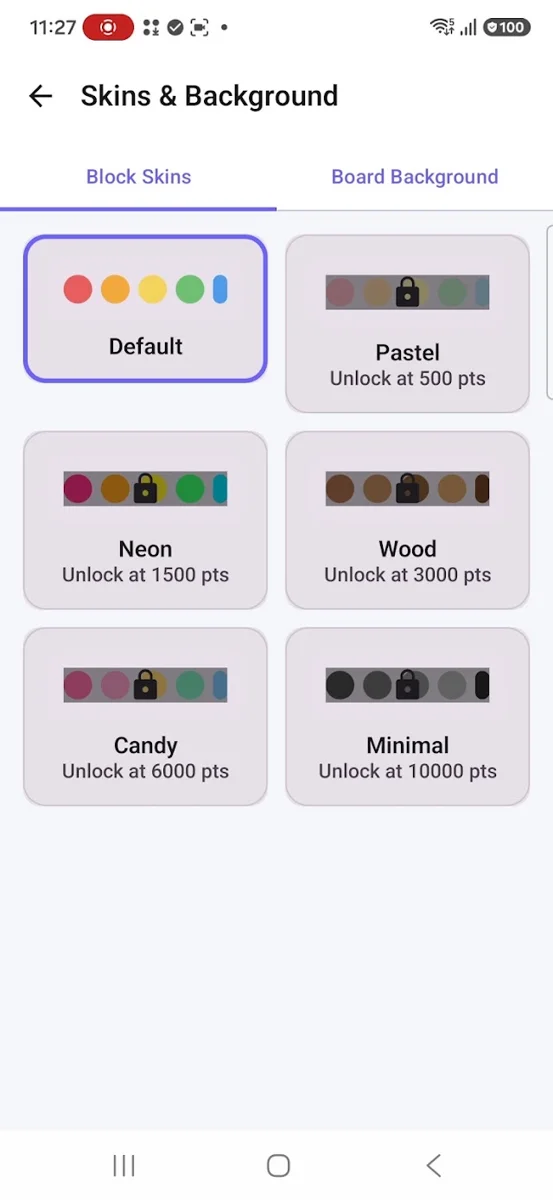
GridJoy’s start-screen screenshot shows Skins & Background. Its customization screen separates Block Skins from Board Background. A skin changes the look of the blocks; a background changes the surface behind them. Evaluate them together, because a block that stands out on one background may blend into another.
The screenshot shows named skins, including Default, Pastel, Neon, Wood, Candy and Minimal. Some show score-based unlock labels. These are examples from the store build, not a promise that every option is immediately available in every installed version.
Check readability on the actual board
Begin with a simple background. Select an available skin, then return to play and examine a board with both occupied and empty cells. Do not judge only from the color samples in the settings screen.
Ask whether you can identify a block’s full shape at a glance. Check neighboring colors, the grid lines and the unused spaces. If you need to stare at the screen to separate a piece from the background, try a simpler combination.
Personal images can compete with the puzzle
The existing studio material describes background customization, including a personal image. If that choice is available in your build, a low-detail image is easier to evaluate than one filled with sharp patterns, text or faces. The aim is to keep the board readable, not to fill every part of the screen with detail.
Do not infer how an image permission works from this guide. The current app-specific privacy disclosure and Android permission prompt should explain what access is requested.
Report a visual problem precisely
If grid lines or pieces become hard to see, report the skin name, background choice, device model and app version. Include a cropped screenshot of the board, avoiding private content in a personal background.
Explain what is unclear: two block colors blending together is a different problem from a grid line disappearing. That distinction gives the studio a more actionable report than simply saying the theme looks wrong.
A look inside GridJoy
Try it in your next session
Keep the combination that makes decisions easiest to read during play. Revisit the board after changing one appearance setting, rather than changing both the skin and background at once.
Rules and features checked against the studio catalog and public Google Play description on October 15, 2026. Your installed build may differ.